

Presentation Management Portal for Conferences & Events
The Slidecrew Presentation Management Portal ensures that your presentation files are always where they need to be, at the right time, in the right room.
The Presentation Management Portal brings together speakers, presentations, session schedules and event staff in one central system. Combined with a set of on-site apps, it supports a clear and reliable workflow for presenters, technicians and moderators before and during the conference.
In addition, Slidecrew supports practical on-site peripherals such as timers and digital signage, all updating in real time from the same portal.
Manage and Create your Events from the Same Account
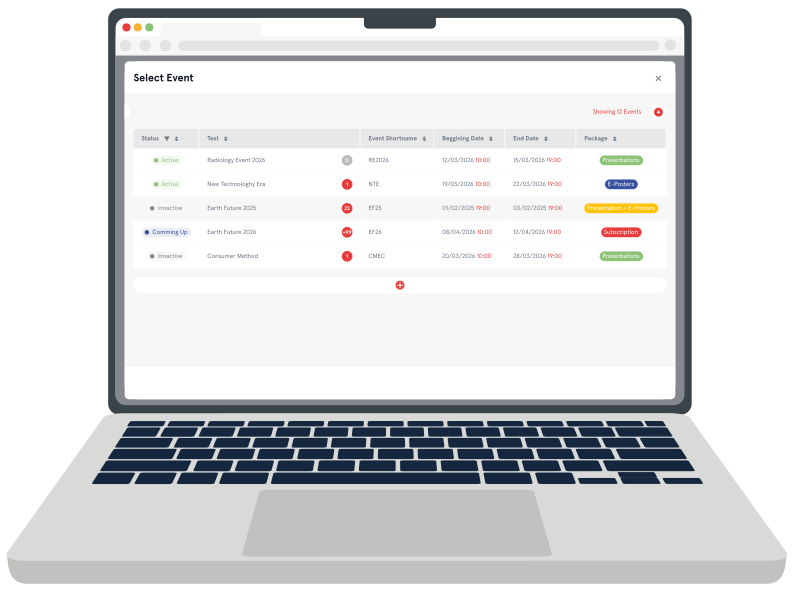
With Slidecrew, you can create and manage your events from a single account, giving you a clear overview of all active and upcoming conferences.
Our Event Creator guides you through the setup of your event, allowing you to define the required conference rooms, ePosters and overall event structure. When importing your programme from Excel, conference rooms, sessions, presentations, moderators, speakers and ePosters are created automatically, reducing manual setup and avoiding duplication of work.
To support integration with existing event technology stacks, Slidecrew offers native synchronisation with EventsAir using a GraphQL-based connection. This keeps programme data, speakers and sessions aligned between systems. In addition, the Slidecrew API allows custom integrations with other conference management platforms.
For organisers who prefer a hands-off approach, Slidecrew also offers a paid service to import and validate Excel programme files, ensuring the event structure is correctly configured and ready for use across the portal and on-site apps.ce management tools:

Create and edit your Programme, Sessions, Presentations and ePosters
As the central presentation management portal, Slidecrew keeps programme data, presentation files and on-site workflows aligned throughout the conference.
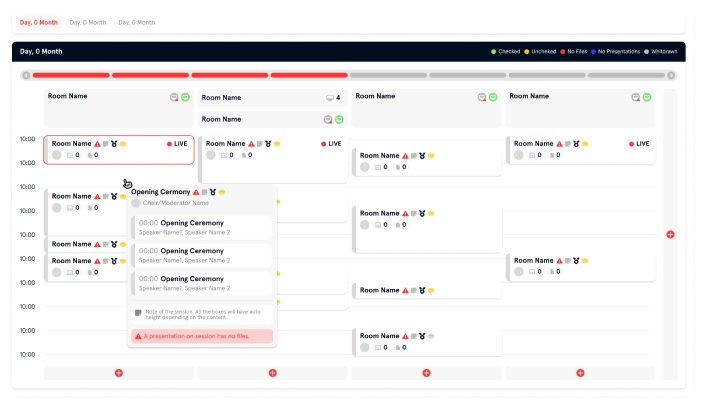
Discover a user-friendly event programme page, designed to give you a clear overview of your entire conference programme, including keynotes, breakout sessions, workshops, sponsored or satellite sessions, symposiums and ePosters.
The Slidecrew portal allows you to manage complex, multi-room and multi-track programmes with ease. Sessions and ePosters can be assigned to specific conference rooms, lecture halls, meeting rooms, auditoriums or dedicated ePoster areas, ensuring all content is always linked to the correct location.
Modifying your event schedule is straightforward, even close to the start of the conference. Changes to session times, room assignments, presentation order or ePoster availability are reflected throughout the platform, keeping speakers, moderators and on-site teams aligned.
Important programme details such as start and end times, session titles, presentations, ePosters, moderators or chairs can be viewed and edited from a single interface, presented in a clear and structured format that supports both planning and live event operations.
Files Management in the Presentation Management Portal
Managing presentation files and ePosters is a central part of the Slidecrew portal. Presentation files and (video-) ePosters are linked directly to sessions and presentations, ensuring they are available in the right room at the right time.
Speakers upload their presentation files or ePosters using a personal upload link. This allows them to submit files in advance without needing full access to the event portal. Multiple files can be uploaded per presentation.
Within the portal, the status of each presentation is clearly visible. This shows whether no files are required, files have been uploaded, a presentation has been checked in at the Speaker Preview Room, whether it is a remote presentation (for example via Zoom), a pre-recorded presentation, or if a single shared slide deck is used for the entire session. Uploaded files can be reviewed in advance by session moderators and event staff.
The Slidecrew platform supports common conference presentation formats including Microsoft PowerPoint, Apple Keynote, Adobe PDF and OpenOffice ODP, with individual file sizes supported up to 5 GB.

Automated File Scanning Tool
When presentation files or ePosters are uploaded to the Slidecrew portal, they are automatically analysed using the built-in file scanning tool. This helps identify potential issues early, before speakers arrive on-site or sessions begin.
The file scanning tool checks a range of technical and structural elements, including whether a disclosure slide is present, slide aspect ratio, unsupported fonts, large image files and external links. It also detects embedded video and audio elements and verifies that media is correctly embedded in the presentation file.
In addition, the scanning tool identifies whether a presentation was created on macOS or Windows. This information can be relevant for events with specific playback environments or where certain file origins are known to cause fewer issues.
The results of the file scan are available as a clear file report within the portal. Key technical details, such as the presence of video or audio slides, are also visible in the Technician App, allowing technicians to prepare playback in advance and reduce the risk of issues during live sessions.
File Check in the Speaker Ready Room.
After automated file scanning, presentations can be reviewed and confirmed in the Speaker Ready Room. This allows speakers, moderators and event staff to check presentations together before the session starts.
During check-in, speakers can preview their presentation, confirm the correct file version and verify that video or audio elements play as expected. Any last-minute updates or replacements can be handled in a controlled environment before the presentation is delivered in the session room.
From the Slidecrew portal, presenters can be assigned to the check-in queue for the Speaker Ready Room. Speakers can be added to the queue by selecting them by name or by scanning the QR code on their badge at a check-in station. This helps manage speaker flow efficiently, even during busy peak moments.
Once a presentation has been checked, its status is updated in the portal. This gives organisers, moderators and technicians a clear overview of which presentations are ready, which still require attention, and which sessions do not require presentation files, such as panel discussions or remote presentations.
Automated Email Campaigns
Slidecrew includes automated email campaigns to support communication with speakers, moderators and session chairs throughout the event lifecycle.
Email campaigns can be triggered automatically based on programme data and presentation file status. Typical use cases include inviting speakers to upload their presentation, sending reminders ahead of deadlines, or confirming that files have been received and reviewed.
Emails are linked directly to sessions and presentations, ensuring recipients receive only information that is relevant to their role and session. Personal upload links and access to required forms can be included directly in these emails, reducing manual follow-up and improving response rates.
Automated email workflows are configured per event within the portal, allowing organisers to align communication with their own timelines and processes.
For a more detailed overview of speaker communication and presentation upload workflows, see the Presentation Collection feature.
Build and Share Customs Forms
Personalised forms for moderators and speakers are simple to set up using the built-in form builder, on a per-session, per-person or per-presentation basis.
Drag and drop information or question blocks into your form to customise it, then save to make the form instantly available for completion. Submitted forms can be viewed individually as PDFs or exported in bulk as a spreadsheet.
By combining automated email campaigns with custom forms, organisers can ensure required information is requested, collected and available at the right moment in the event workflow.
Event Styling
Slidecrew allows organisers to configure the visual styling of their event directly within the portal. This ensures a consistent look and feel across speaker upload pages, publication pages, on-site displays, digital signage and ePoster areas.
Event branding can be customised by uploading an event logo and background images. Different background images can be defined for standard layouts and portrait displays, allowing the portal, publication pages and on-site screens to adapt to different environments and orientations.
Styling can also be adjusted per room or per session, for example to visually distinguish sponsored or satellite sessions. This makes it possible to apply specific branding where required, without affecting the overall event style.
In addition, colour settings such as background colours, highlights, headings, text colours and fonts can be configured to match the event’s visual identity. These settings are applied consistently across upload pages, publication pages, digital signage and ePoster displays, including colour styling for ePosters.
By managing event styling centrally in the portal, organisers can ensure a professional and coherent visual experience throughout the event, both online and on-site.
Get Organised for Your Conference
The Slidecrew Presentation Management Portal brings together programme management, presentation files, speaker workflows and on-site operations in one central system. From event setup and speaker communication to file checks, session preparation and event styling, the portal is designed to support the realities of live conferences.
As a presentation management portal built for live conferences, Slidecrew supports organisers, venues and AV teams throughout the entire event workflow.
By combining automated processes with clear on-site workflows, Slidecrew helps organisers, conference venues and AV teams stay in control before and during the event — reducing last-minute issues and improving coordination across sessions, rooms and teams.
To understand how these features fit your event and budget, take a look at our pricing options. Slidecrew offers clear and affordable pricing models that scale from smaller meetings to large, multi-track conferences.
Get organised for your next conference with a platform built specifically for professional presentation management.